Recently I’ve been teaching myself C#, together with the Microsoft XNA game engine.
XNA is really a freeware toolkit rather than a full engine. Microsoft launched this to make hobby and indie game development approachable. It sits on top of the .NET Framework and can target both Windows and the Xbox 360. For an indie developer these days, XNA feels like the most practical way to getting something onto the Xbox.
With it I’m building a 2D platformer inspired by the 1993 puzzle‑platformer The Lost Vikings (by Silicon & Synapse, now Blizzard). You control two characters, a young adventurer who can run, jump, and fight; and a ghost who can slip through obstacles and possess enemies (but can’t interact physically otherwise).
Using XNA means starting almost from scratch, no editor, no built‑in collision detection or animation system. Aside from the renderer, you cobble together all your own tools. That constraint is exactly why it’s such a good learning environment, hands‑on engine fundamentals without first sinking years into a custom C++ engine black hole. I know there are different schools of thought on this.
My current tech demo implements tilemaps, a sprite-based animation system, and AABB (axis‑aligned bounding box) collision detection, basically checking whether two rectangles overlap eachother by testing their edges on both X and Y.
I’m also building a level editor by using the .NET Windows framework, and drawing the XNA runtime on a canvas inside the window. Basically the entire game is playable inside the editor, a feature which just seems logical these days. Levels export to XML, straightforward and easy to read for on an Xbox 360 (the OS supports XML natively).
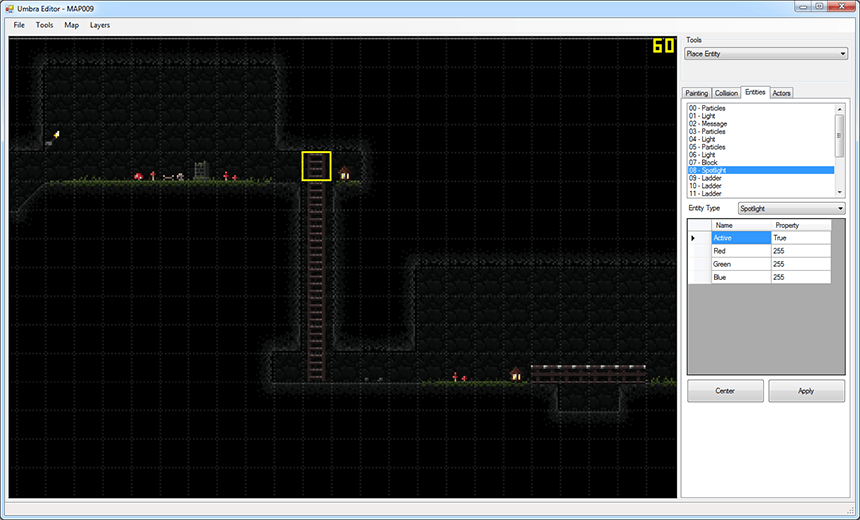 Editing a level in my custom “Umbra” level editor.